
I’ve tried more note-taking apps than I’d like to admit. Apple Notes, Notion, Evernote, that one app I downloaded, used for two days, and forgot existed. Every single one had the same problem: my notes lived on someone else’s server, and if the app changed its pricing or shut down tomorrow, so did my notes. That never sat right with me, and it’s why I eventually landed on Obsidian and never looked back.
What Is Obsidian?
Obsidian is a note-taking app that stores everything as plain Markdown files, sitting in a normal folder on your own computer called a vault. No account required, no cloud lock-in, nothing proprietary. If you opened your notes in a basic text editor with no Obsidian installed at all, they’d still make perfect sense. That’s the whole foundation the rest of the app is built on.
Why Obsidian Beats Most Note Apps
- Your notes actually belong to you. They live as local files, not inside a company’s cloud, so nothing changes if the app disappears tomorrow.
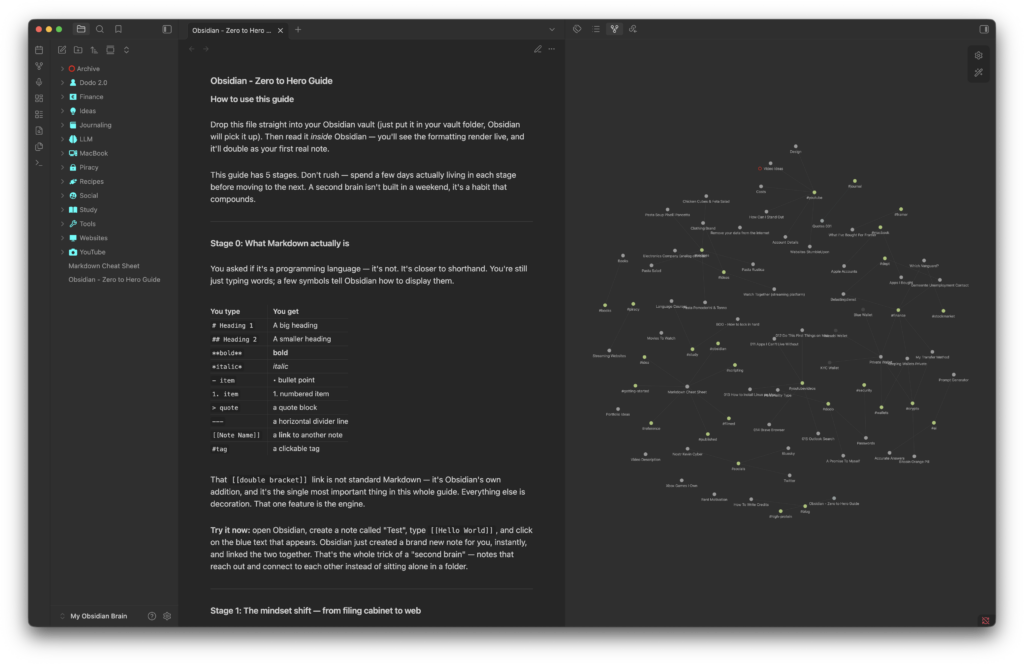
- Everything links together. Type
[[next to any note to link it to another, and Obsidian builds a visual Graph View showing your notes as a connected web instead of buried folders. - It’s genuinely free. No note limits, no feature gating, whether you’re using it personally or at work.
- Plugins let you stretch it into anything. With over 5,000 community plugins available, whatever workflow you’re picturing, someone’s probably already built it.
- Canvas and Bases cover visual and structured thinking. Canvas is an infinite whiteboard for dragging notes and ideas around spatially. Bases, added in early 2026, turns your notes’ properties into a live, filterable table or card view, no coding required.
Getting Started: Step-by-Step Setup
- Download the app for free from obsidian.md — available for Windows, macOS, Linux, iOS, and Android.
- Create your first vault, which is just a folder, so pick somewhere sensible like a folder in Documents or iCloud Drive.
- Write your first note using standard Markdown formatting (
**bold**,# headings,- bullets). - Link it to another note by typing
[[, letting Obsidian prompt you to link or create a new one. - Turn on Daily Notes and Canvas in Settings → Core Plugins, both ship with the app already.
- Check Graph View in the sidebar to see your notes visually connected.
- Set up sync, either through the paid Obsidian Sync service or a free option like iCloud Drive or Dropbox.
Best Obsidian Plugins to Install First
Once the basics feel natural, head to Settings → Community Plugins and add these one at a time:
- Calendar — a visual monthly calendar that opens or creates your daily notes
- Dataview — queries your notes like a lightweight database
- Templater — automates repetitive note formats like meeting notes or journal entries
- Tasks — turns Obsidian into a real to-do manager with due dates and recurring tasks
- Kanban — adds drag-and-drop project boards inside your vault
- Excalidraw — a full hand-drawn-style sketching tool embedded directly in notes
Add one, use it for a week, then reach for the next only once you’ve actually hit a wall the current setup can’t solve.
Obsidian Pricing: What’s Actually Free
The core app costs nothing, for personal or commercial use, with no sign-up required. The paid add-ons are entirely optional:
- Obsidian Sync — $4/month billed annually (or $5/month billed monthly) for encrypted cross-device sync plus version history
- Obsidian Publish — $8/month billed annually (or $10/month billed monthly) to turn a vault into a public website
- Catalyst license — a $25 one-time option for early access to beta builds
- Commercial license — $50/user/year, a voluntary way for businesses to support development, not a requirement
If you’d rather not pay for Sync, iCloud Drive, Dropbox, OneDrive, or Syncthing all work for free, with a bit more manual setup.
The Honest Downsides
- There’s a real learning curve. The basics take five minutes, building a system that actually fits how you think takes longer.
- No true real-time collaboration. Shared vaults let multiple people edit, but not simultaneously in the same note the way Google Docs does.
- It’s Markdown-only. Anyone wanting rich-text or Word-style formatting will find it restrictive.
- Bases is still maturing. Image handling and some advanced queries haven’t caught up to what plugins like Dataview can already do.
FAQ
Is Obsidian really free? Yes, the core app has no note limits or feature gating for personal or commercial use. You only pay if you want their official Sync or Publish services.
Do I need to know how to code to use Obsidian? No. Writing and linking notes requires no technical skill. Plugins and Bases add more advanced options, but they’re optional and can be picked up gradually.
What’s the difference between Obsidian and Notion? Notion stores your notes in its cloud and supports real-time team collaboration. Obsidian stores notes as local files you fully own, at the cost of no true real-time collaborative editing.
Can I use Obsidian on my phone? Yes, the iOS and Android apps support Siri and Shortcuts integration, home screen quick actions, and split-screen use on iPad.
If you’ve been putting off trying Obsidian because it looks complicated, ignore the intimidating setups you’ve seen online for now. Download it, write one note, link it to a second one, and see how it feels. You can always add the rest later.
Photo by Clio Di Giovanni on Unsplash




No comments yet